How we would add floating icons on our site, whether social networks or contact phone and viber, the procedure is explained in the rest of this article. In order to make modifications, knowledge of basic html/css technology is required.
First of all, we enter our Site creator and there we do not have a direct "drag and drop" option, but we do it with two clicks.
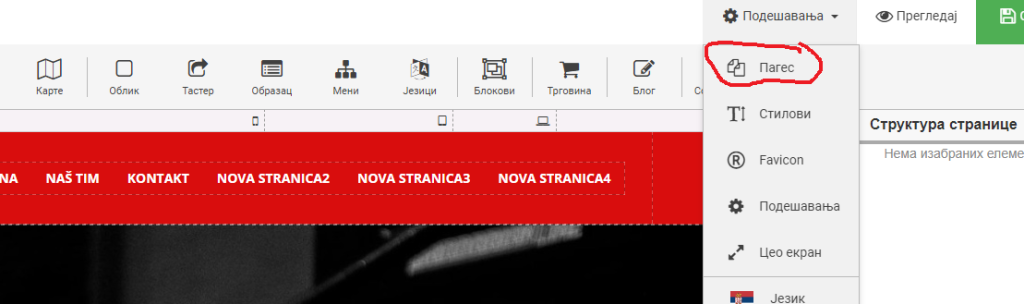
First we go to Settings and then to Pages
After that, a popup window will appear as in the following screenshot, where we go to Scripts and then enter the code given below in the first two fields.
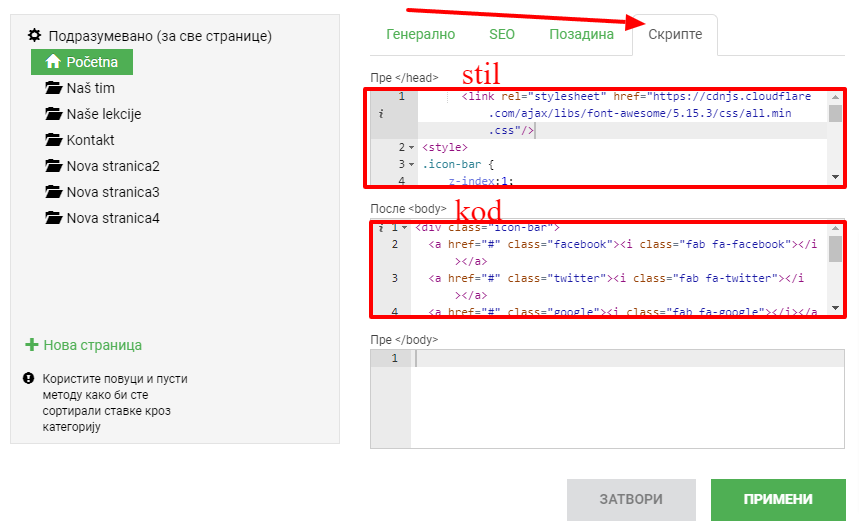
The code we enter into the style:
In the second field for the code, we enter:
<div class="icon-bar">
  <a href="#" class="facebook"><i class="fab fa-facebook"></i></a>
  <a href="#" class="twitter"><i class="fab fa-twitter"></i></a>
  <a href="#" class="google"><i class="fab fa-google"></i></a>
  <a href="#" class="linkedin"><i class="fab fa-linkedin"></i></a>
  <a href="#" class="youtube"><i class="fab fa-youtube"></i></a>
  <a href="#" class="viber"><i class="fab fa-viber"></i></a>
  <a href="#" class="phone"><i class="fas fa-phone-alt"></i></a>
  <a href="#" class="whatsapp"><i class="fab fa-whatsapp"></i></a>
</div>
Let's go to Post and get the social icons like in the screenshot below
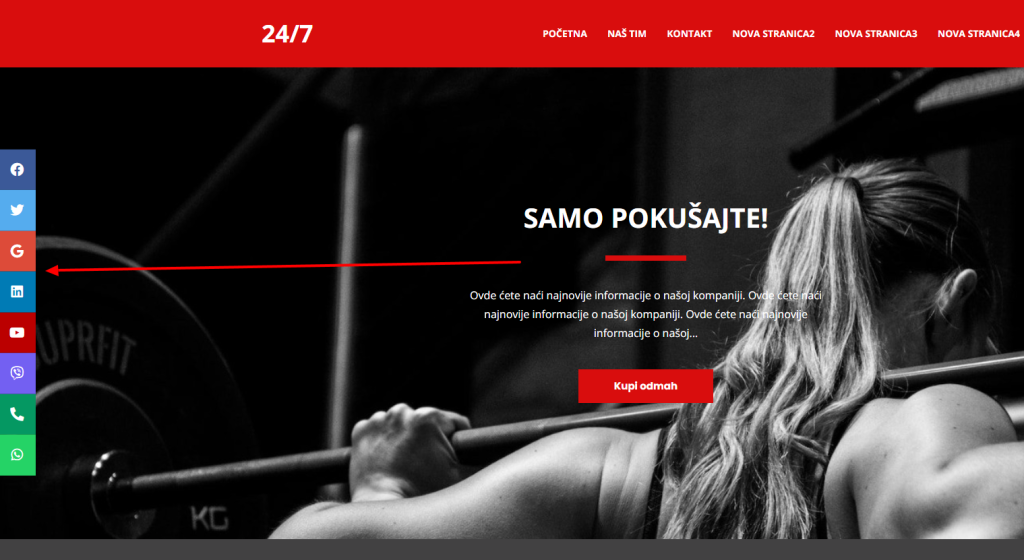
You can change, add and delete these as you want them to be.
Linking
As we inserted them, when clicked they do nothing. We achieve this by having href="#" in our CODE, it generates a link, and the taraba is actually a link. Therefore, if we want to link our Instagram page in the line for YouTube it should say for example:
<a href="https://www.youtube.com/@WebHostingSrbija/" class="youtube"><i class="fab fa-youtube"></i></a>Here, for example, there are special links when it comes to phone, viber and whatsapp. Here are sample links
Viber: href=“viber://chat?number=+38111111111″
WhatsApp: href="https://wa.me/+3811111111"
Phone: href=“tel:+38111111111″
Of course, in the examples above, you enter your phone numbers. The final code for these three icons with numbers and links:
<div class="icon-bar">
  <a href="viber://chat?number=+38111111111" class="viber"><i class="fab fa-viber"></i></a>
  <a href="https://wa.me/+3811111111" class="phone"><i class="fas fa-phone-alt"></i></a>
  <a href="tel:+38111111111" class="whatsapp"><i class="fab fa-whatsapp"></i></a>
</div>
Horizontally in the middle
If you still want it to be horizontal in the middle, here is a small change to the style code (the first square you copy):