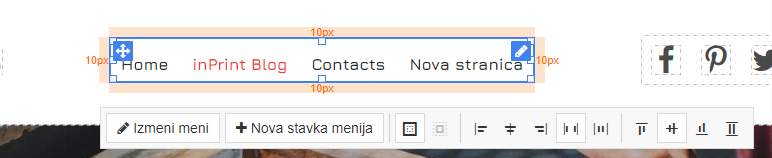
Adding a new menu item/page as well as deleting and modifying it is described in this article. First of all, we enter our site and then click on the menu where options will appear.
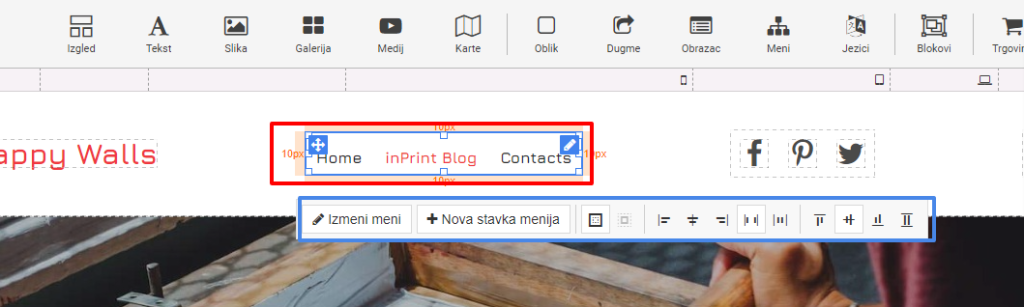
Menu options are marked with a blue square. Here we can go to Edit Menu or New Menu Item.
New menu item we can add a new page immediately and add it to the menu itself.
And if we want to add an already existing page, then we go to the edit menu.
Here we go to New menu item and we get a window like in the picture below.
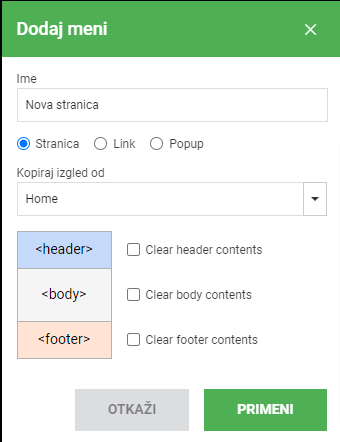
This is where we add the name of our new menu item. Then we choose whether it is a new page (if we haven't created it before, we can now) and it can be a link or a popup. In this case we choose Link because in the previous article we described adding a new page, so now we will link that new page in the menu.
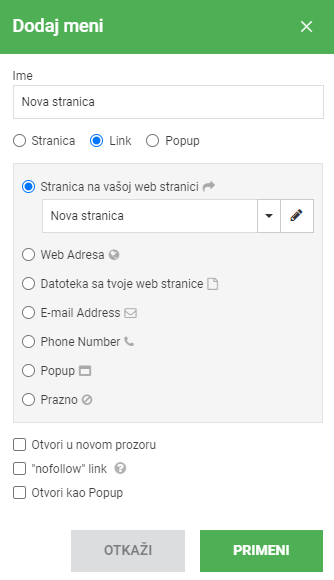
Here we select the first field "Page on your website" and it will immediately list all the pages we previously created and we choose the page we want to link in our menu. As you can see there are other options that pretty much speak for themselves. Save and click apply.