
Here we will do two scenarios. The first is the easier one, and that is through WordPress.
When it comes to wordpress, there is a plugin for that and we won't go into that too much. It's a plugin Contact Form 7. After installation and setup, you need to create an SMTP connection in your wordpress so that your emails arrive without problems. And you can do that with our second article SMTP and WordPress.
The other part that is "harder" is for HTML sites or those that have a hand-made contact page and do not use any CMS.
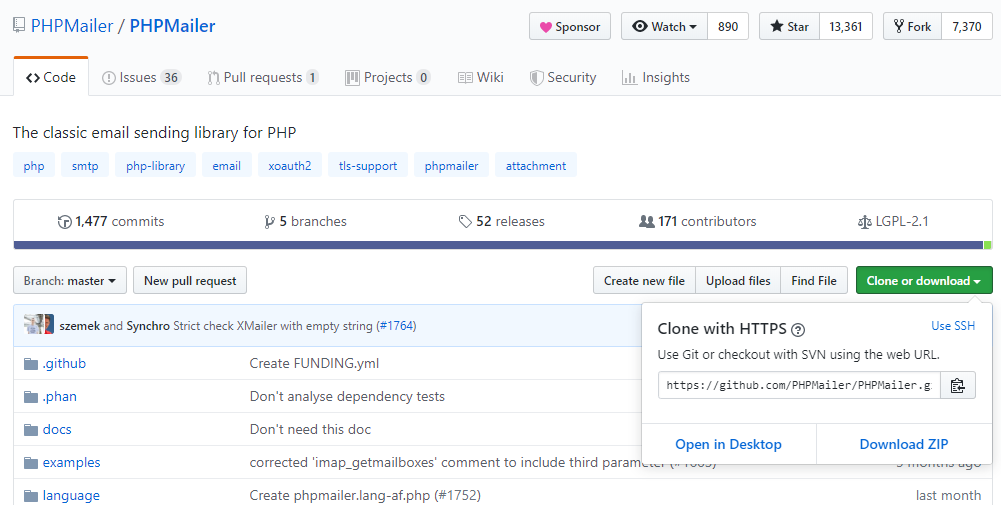
First of all you need to download PHPMailer by clicking on "Clone or download" and then on "Download ZIP".
As in the picture below
After this you need to upload that zip file to your hosting account.
cPanel > File Manager > open public_html folder and inside it "upload" option.
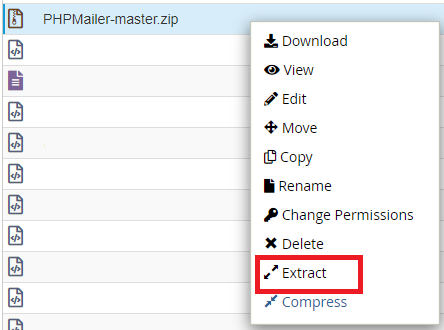
When you have finished uploading, right click on the zip file and extract as in the picture:
Now that we've unpacked that, we need to do our part.
Our example has the following fields:
<form action="/en/kontaktforma.php/" method="post" data-trp-original-action="kontaktforma.php">
    Name:<br>
    <input type="text" id="fname" name="firstname" placeholder="Your name.."><br>
    Last name:<br>
    <input type="text" id="lname" name="lastname" placeholder="Your last name.."><br>
    Email:<br>
    <input type="text" id="email" name="email"><br>
    Text:<br>
    <textarea id="tekst" name="tekst" placeholder="Write something.." style="height:200px"></textarea><br>
    <input type="submit" value="Send"><br>
  <input type="hidden" name="trp-form-language" value="en"/></form>
Your contact form certainly looks different and has different names of input elements and more or less fields, so don't literally copy/paste but mini-settings that are related to your contact form.
The key thing here is the u option

