
Changing http to https is very important in order for you to have Secure green on every page, it means that the entire page is protected by an SSL certificate.

If, for example, you insert images, they will be http and the site will be https and there will be an exclamation mark that will inform you that not everything on the site is protected by an ssl certificate.
Let's change http to https by logging in to the site vassajt.rs/wp-admin/ then go to Settings and then General
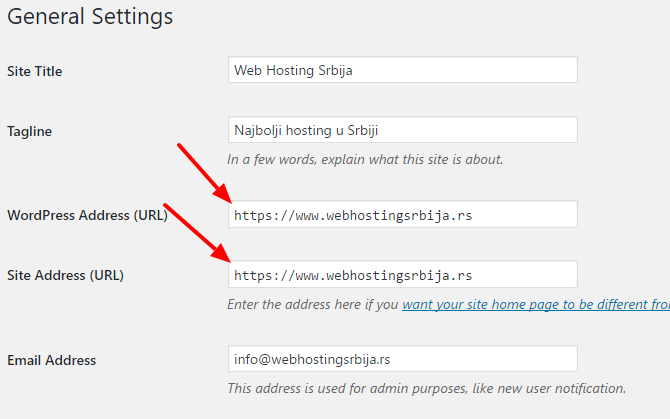
we get a page like in the picture and you have http://www.vasajt.rs in both fields and all you need is to add the letter s (small s) after the letter pi before the two dots to make it https://www.vassajt.rs as in the picture. That's all.

