A frequent question is how many visits can actually be on one package. Is it monthly, daily or user count, item or article count.
In order to clarify the issue, it is first necessary to understand what one visit means?
A visit is when your visitor opens your site, but what does it actually include? This includes downloading all images, text, css, js files to your computer. So when a visitor opens your site, he downloads all those files to his computer. As if it was right click and download or save as. It actually means visit.
Since it is clear what a visit is, i.e. downloading your site to your computer, how much does your site actually take up?
Your site, even though the entire site with all the files takes up, say, 5000mb of space on the hosting account, it can take up only 2mb when opened. How is that possible?
When the user visits your site (and downloads everything mentioned), he does not download literally every file, because you have, for example, 1000 items on your site, but on the home page, for example, 10 are displayed, so he downloads images (small images if optimized) of only ten items and not all 1000.
How to know exactly how big the site is when it is visited you can check on the site gtmetrix.com enter your domain and click on test and after analysis it will show something similar to this at the bottom of the page:
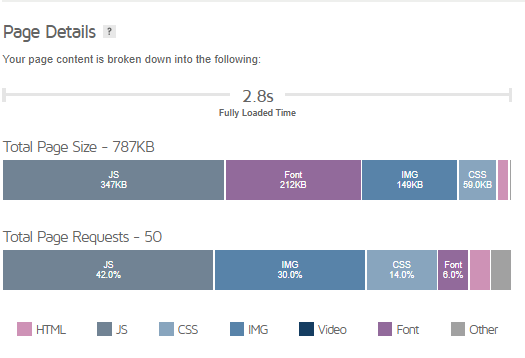
Here we see that the complete page is 787 KB even though the site itself is larger than 2GB.
Also useful information is that there were 50 requests. This means that the above mentioned 50 times your visitor downloaded javascript, images, css, font, images, text means 50 of those elements (50 times right click then download).
And a time of 2.8 seconds means that the site was loaded for the client in 2.8 seconds, if the visitor has a slower internet then that time is even longer.
Now that it is increasingly clear what a visit to the site entails and how much it actually takes up the resources of your hosting account, then comes the next question.
How many visits can a hosting account support?
First of all, it is very important that you have understood what was written above, if you have not, then the answer to this question will not be clear to you.
Any hosting account has no restrictions on the number of visits per year, per month, per day, per hour or at the same time. The number of visits depends on the CPU, RAM memory, the number of processes and, most importantly, the site itself. Because if the site, for example, loads in 1 second and has 20 requests, it can support 1000 visits at the same time and in the same second on the basic package. And also a site that loads in 5 seconds and has 100 requests can support 100 visits on the same package. Therefore, the answer to the question of how many visits can be per hosting account is not very well stated because there is no answer.
Which means that the site should be optimized so that the loading time is as short as possible because it uses less hosting resources and can support more visits, also the number of requests is lower because the number of processes is less and you also increase the number of visits your site can support at that moment.
How do you know which package to choose for you?
Every hosting account (literally every one) gives the possibility of a trial period, and in addition it gives the possibility of changing the package. You should definitely start with a smaller one, so when you reach a certain limit (or space or resources), then you can go to a larger one with an additional fee.
If the site has not been active until now and you are now starting work, take the basic package, because at the start there will not be many visits unless you allocate a minimum of 50 - 100 euros per day for advertising, in that case, take a more advanced package.
What helps to get as many visits to the site as possible?
Site optimization. Image optimization, code optimization, reducing the number of plugins and unnecessary things.
In 90% sites, the problem is images because they are placed unoptimized. Each image placed on the site should not be larger than 150kb (this is the maximum of the maximum, HD images and the like, while ordinary images should be twice as small) and this does not include the resolution but the size.
We also have server caching on our hosting, which helps a lot with speed and reducing requests, but it is necessary to use a plugin to do this and it requires a bit of setup (you have instructions on our site). And when all that is taken care of, then you know that the site is optimized and then if you reach a certain limit of CPU/RAM/Processes and the like, it means that you need a bigger package because the number of visits exceeds the package. And how do you know that the site is optimized? If the size of the site is not larger than 2mb and if it does not exceed 80 requests and if it loads in less than 4 seconds, it means that the site is optimized.