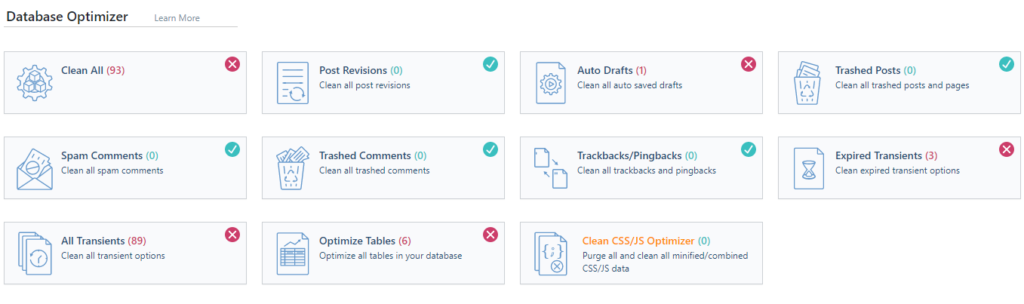
As you can see some fields have x and some checked ok.
Clean ALL: will clean the tables completely except Optimize Tables and Clean CSS/JS Optimizer.
Post Revisions: Will delete any old post versions you have so they don't take up too much space. When you enter text, wordpress itself changes the content, wordpress saves your every change. This deletes all version traces. Note that this does not delete old articles or pages, only duplicates that you are not using.
Auto Drafts: When you make changes or create a post, wp itself saves the post in drafts in case something happens and you lose what you've done.
Trashed Posts: Completely deletes posts that you have already deleted but not completely.
Spam Comments: deletes comments marked as SPAM.
Trashed Comments: completely deletes comments that you have deleted but not completely.
Trackbacks & Pingbacks: When someone links to your site, it creates a trackback and a pingback. Some wordpress themes display this in the comments and with this you delete the excess and get rid of that data.
Expired Transients: Temporary data stored in the database. This deletes those that are outdated and no longer used.
All Transients: deletes all temporary data regardless of whether it has expired or not.
Optimize Tables: Use this button to optimize your database. A very useful option.
Clean CSS/JS Optimizer: If you use the minify or combined options for css and js, you can use this to clean and delete that data. In the event that something is not being read correctly, and you have doubts about those options, you can check them and create new ones.
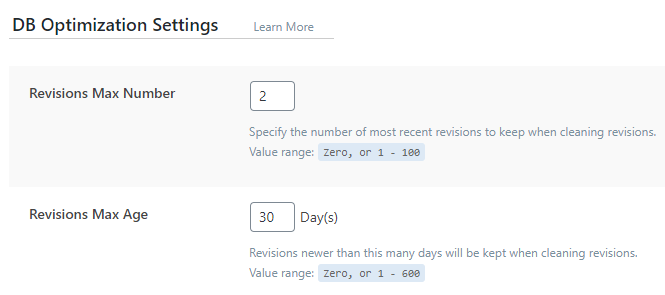
Revision Max Number: the number of versions stored in the database of your article or page.
Max Age Revision: Number of days the older version will be kept since the last change.