
First of all, you should first check if your site has an official email address (something dot your domain dot something: domen.tld) if it's wordpress check it in Settings - General and in the email field your official email address should be there. If it is not there, enter it (you also need to create it there […]
Of course, you can use gmail or any other free mail provider here, but it's not very professional and appealing to the eye, right? Therefore, we will not even write about them, especially since everyone can have their own email, whoever has a website.
After that, is your site connected to the mail server via SMTP?
If you're wondering something like: how do I know that? Then the answer is that 99% is not connected. This is immediately the main reason why mail goes to spam.
In one of the previous articles, we wrote how to connect your website to a mail server. SMTP and WordPress
Now that we have an official email address and we have SMTP properly connected to the email and the site the next step is to test if the email will end up in SPAM.
There are many tools, but we will single out one of them: https://www.mail-tester.com/
When you open the site, the following appears:

Now you need to send one email to the email that appeared in the white rectangle.
How to send an email is quite simple, you can simulate the creation of an account and enter the email address that came out to you or simply send an email to someone via a mail client or webmail.
Once you've done that, click on the blue square and you should see an image like this:
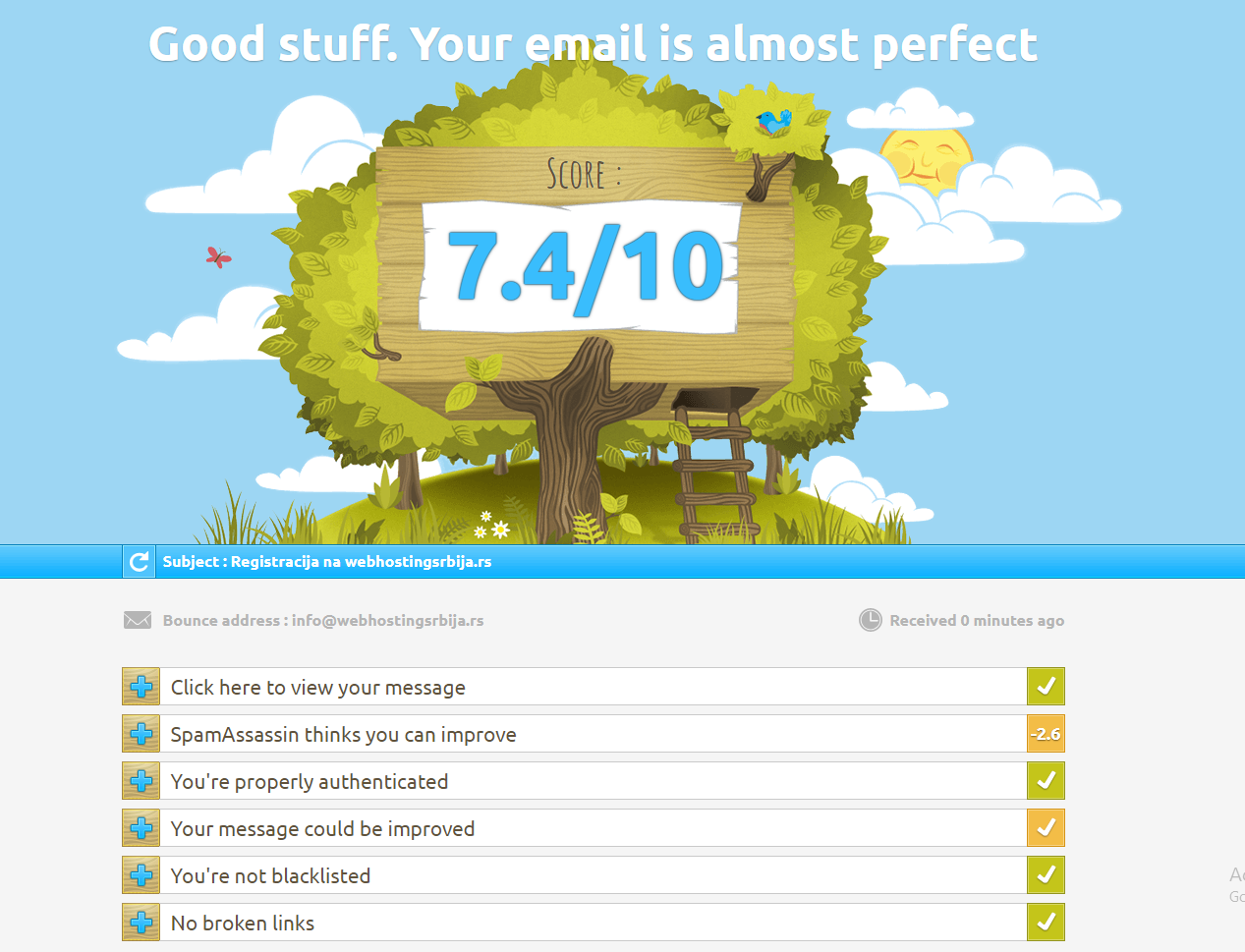
There is also a score. As you can see from a maximum of 10 points. If it's lower, don't panic right away, it doesn't necessarily mean it's bad.
First, let's go step by step, as you can see, there are a couple of items that check the possibilities that will cause the email to end up in the spam folder and not in the inbox.
The first item, a simple review of your email, if something is wrong, it will be written, but it will not be included in the score.
The second item, as you can see with us, is already included and there is the first check. When we click on it.
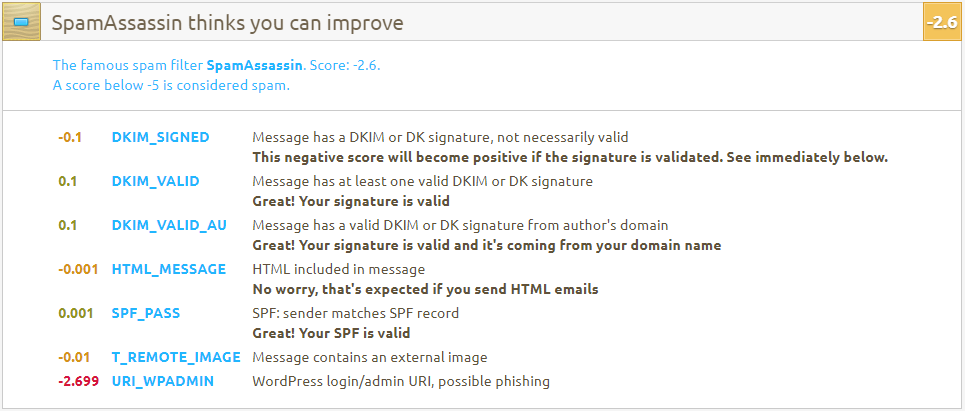
We will also see the messages. As you can see the ratings and what is negative. The most dangerous thing here is that you don't have DKIM and SPF (we'll write how to add them at the end of the article). And we received the lowest rating because the registration data is obtained on the site, so it says that phishing is possible. You shouldn't worry about that, because the note above says that any rating below 5 is considered spam. And this, no matter what you do, it won't drop even close to 5 if you have DKIM and SPF active and correct.
The third item, what does it tell us?.
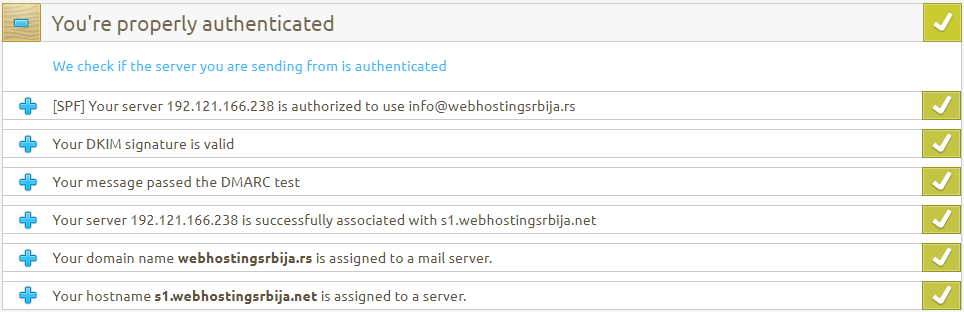
Here you will most likely have a negative rating, especially where there is a DMARC test, which hardly anyone has, although it is set the same as DKIM and SPF (and it will be at the end of the article).
Here, if the last 3 items are not good, contact your hosting provider to correct it because it is not up to you. What you can do is the first three and that's all.
So as written DKIM, SPF and DMARC are correct and valid. DMARC is popular lately because gmail very often sends emails to spam without this record.
Fourth step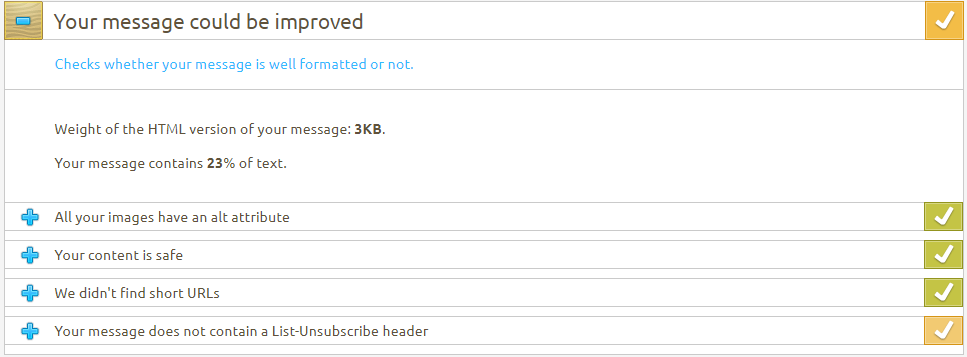
The fourth step is also important because it shows how the software on the server treats your email. How big is your email, content, how many images, how much text, is it html or not. Are there any links that are broken or do not lead anywhere. All of this affects spam. If everything is in order (from the technical side of the previous step), this is also very important what the email will be. Because today's software, in addition to learning by itself, also has rules by which it recognizes spam messages.
As you can see here, he does not give a negative rating, but he suggests that a link be inserted in the header of the message where the user can unsubscribe from the mail list if he does not want to receive more messages. It also further prevents your email from ending up in the spam folder.
The fifth step is important because even if everything is fine, if your server is located here, there is no escape for you.
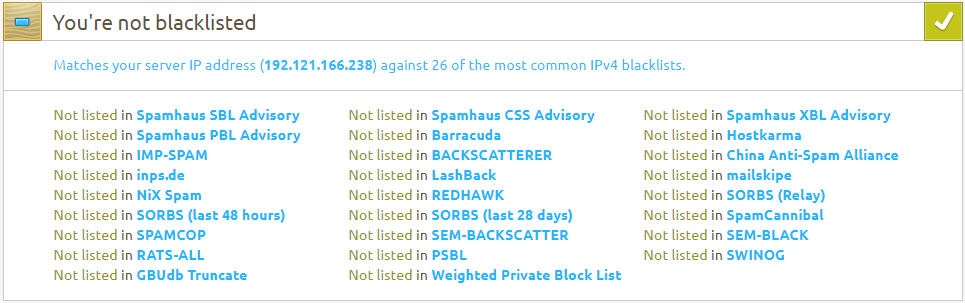
This MUST be as in the picture, ie it says that you are not on the black list. What does that actually mean?
If you are on at least one list, ie your server where you have your site, then there is a huge possibility that your emails will not even be forwarded to the client, you will not even reach the SPAM folder. Systems simply block any emails from servers that are on a list. That's right and it prevents server abuse.
If it says that you are on the list, that's where the biggest problem is. You must urgently contact your hosting provider and request that your site be migrated to another server whose IP address is not on the blacklist or that they do something about it.
The unblocking process may take a few days.
How a hosting provider can prevent their server from ending up here is quite simple, by preventing bulk emailing on hosting accounts with various limits and software.
The last step is where it says that you don't have any bad links, i.e. those that don't work or similar, and that's the end of your test.
Now that we've finished all this and you happen to have a negative rating for DKIM, SPF or DMARC, here's how to add it in cPanel.
This doesn't just apply to cPanel, but wherever your DNS is located (maybe it's cloudflare too if you use it, but the data and fields are the same and they're called the same everywhere, only the path to them is different).
Let's say you've logged into cPanel and found a button Zone Editor, then click Manage.
All DNS settings for that domain have been opened for you.
Then you add DNS records as shown in the picture:
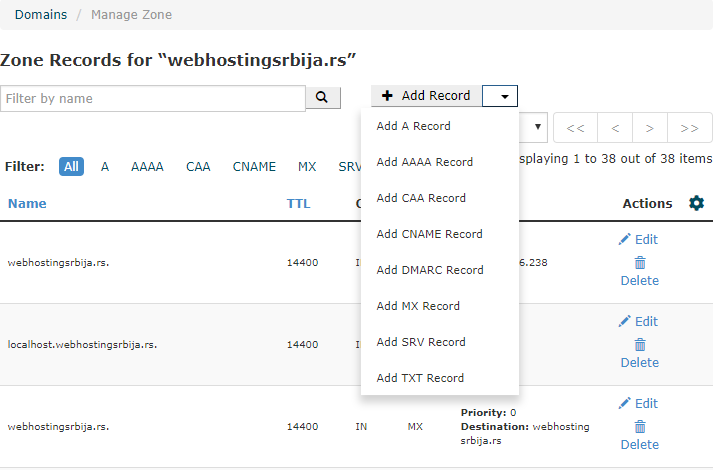
To add DKIM (if it says above in the tester that you don't have it), visit: https://dkimcore.org/tools/
In the domain field, enter your domain.
Let's focus on the part as in the picture

‘'‘1527111051.webhostingsrbija._domainkey.webhostingsrbija.rs:v=DKIM1;p=MIGfMA0GCSqGSIb3DQEBAQUAA4GNADCBiQKBgQDLj5ok3n1n6AoqBa2OSOKlvgkhWOjkviFtR42lDBbgFZ7E0jfX0UxrQGf/YTMGiFM BCu/Jj+V311TZhCI1T0cJKnh6mEdf/ajRfIEYlzXomMnXEOeZWO7mvqb7gT9Ek1a423btrVfvVxuN2QaETZI3U+rCnwh8t367HQjrwpA1TwIDAQAB:3600::
I have separated this "code" into two parts. The first part, bold, goes to one field, the second part, slanted, goes to another field. The first part goes from the beginning (without the apostrophe) to the end of your domain ie to two dots and the second part goes from two dots ie from v equal to DKIM1 and almost to the end ie until it meets the first two dots as you can see.
This is added to the Record TXT.
So we click in cPanel "Add TXT Record" immediately below, two input fields will appear.
In the first field, we enter "Name" as in the example in bold.
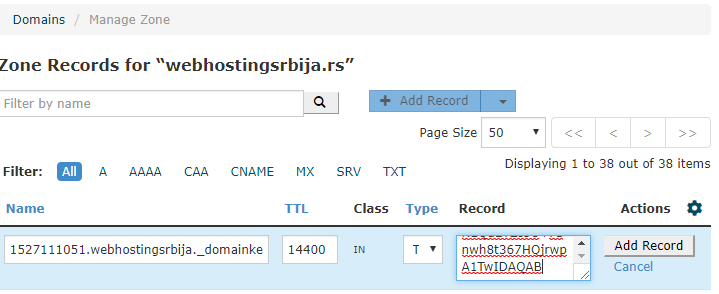
And in the second part where it says Record, we enter the slanted part from colon to colon. Then we click Add Record and that's it.
We have added a DKIM record, congratulations.
Adding an SPF record, click again on Add TXT Record in the first field "Name" should be only your domain. In the second field where it says Record, it should be "v=spf1 +a +mx +ip4:192.121.166.238 ~all" where the ip address indicates the ip address of your server. How to find ip address: https://ipinfo.info/html/ip_checker.php
Save and you're done with the SPF record.
How to add a DMARC record?
Click Add TXT Record.
The first part should read "_dmarc.vasdomen" (without quotes) and the second part where Records should read "v=DMARC1; p=none;" (without quotation marks). Click on Add record and you have added DMARC.
Now you are fully equipped with DNS and your email should not end up in spam. If it still happens, ask your hosting provider for advice and to check the dns settings, if everything is fine, change the message style.

