
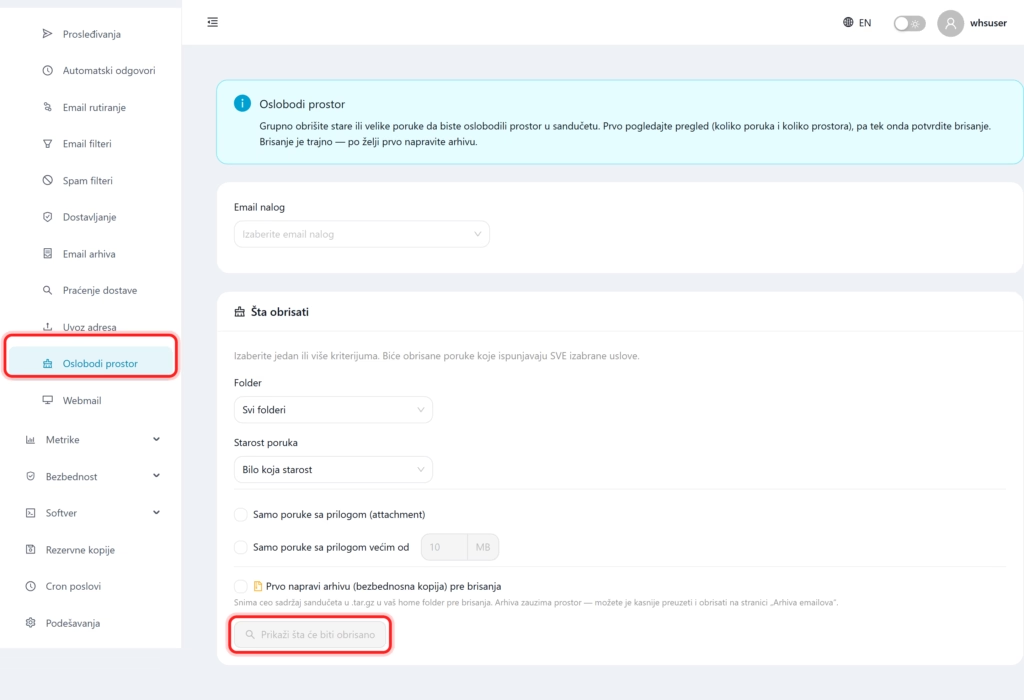
This tool deletes old or large messages in bulk to free up inbox space. First, it shows you an overview (how many messages and how much space would be deleted), and only then you confirm. The deletion is permanent, so create an archive if you wish.
1. What is it for?
When the mailbox is full and close to the quota, new mail may stop arriving. Instead of manually searching and deleting, here in a few clicks you can remove old or bulky messages according to clear criteria.
2. How to free up space
- Open in the menu Email well Using the disk, and in the field Email account select mailbox.
- In the work What to delete? set the criteria (messages that meet the criteria will be deleted everything selected conditions):
- Folder (all folders or specific ones),
- Age of messages (for example older than one year),
- Only messages with attachments or only contributions greater than given size.
- Check if desired. Create an archive first. to save everything first as a backup.
- Click Show what will be deleted to see the preview, then confirm the deletion.
Watch out: deletion is permanent. Always look at the preview first, and if you may need messages, turn on creating an archive before deleting.
