
Mail import copies all messages from a mailbox on another mail server to your mailbox in WHSPanel, using imapsync. It is ideal for moving from old hosting without losing mail. The original mailbox is not changed, and the tool can be safely run multiple times because it only copies new messages.
1. Before you start
First in the work Email accounts create a destination address (same as on the old server). This tool only transfers messages, does not create orders.
2. How to migrate a mailbox
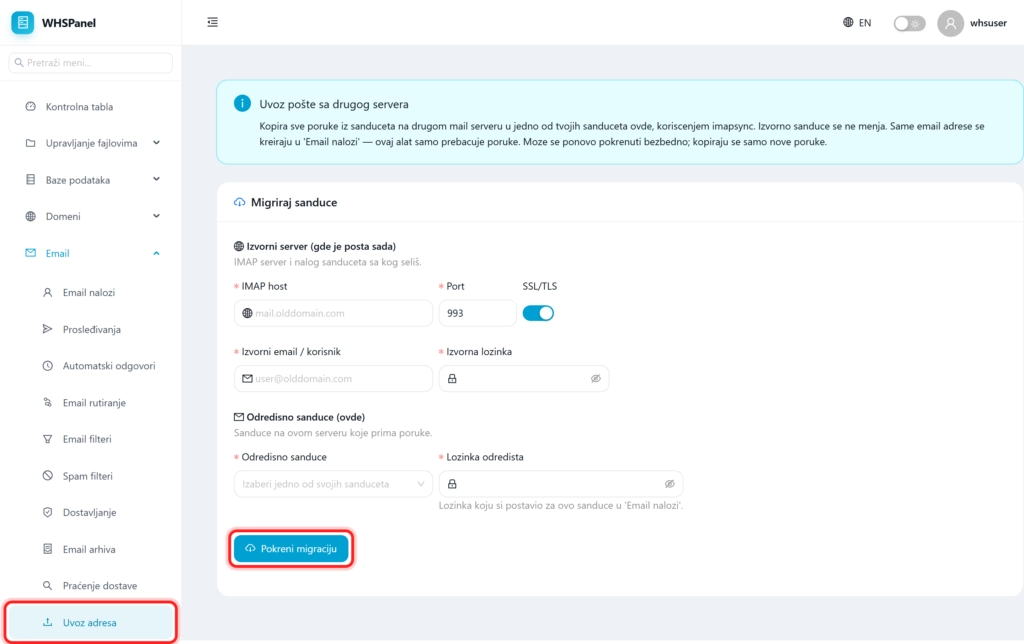
- Open in the menu Email well Import addresses.
- Origin server: write IMAP host old server, Port (usually
993) and leave it on SSL/TLS. - Enter original email and password (the account you are moving mail from).
- Destination mailbox: select one of your mailboxes here and enter its password.
- Click Start migration.
Note: since only new messages are copied, you can start the migration multiple times. A convenient order of the move is: first run the import while the old email is still working, then when you have transferred most of the mail, transfer the MX record to our server and run the import again to pick up the last messages.
