
Delivery tracking shows what happens to email messages that pass through the server: what is sent, received or rejected. When someone tells you that they didn't receive a message, here you can quickly check whether and how it was delivered.
1. Overview in numbers
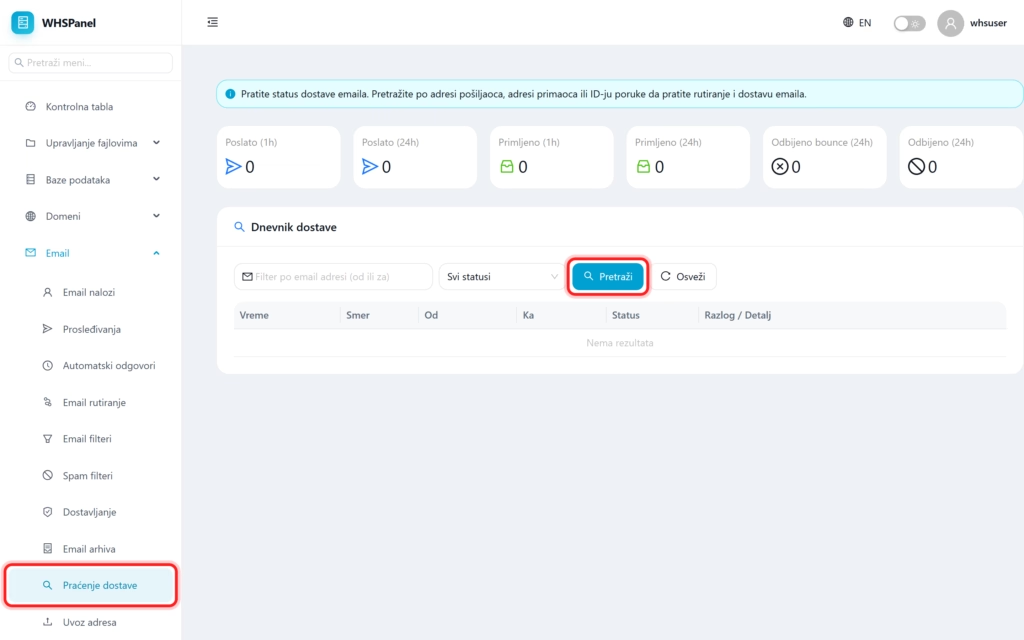
Open in the menu Email well Delivery tracking. At the top are the speed dial cards:
- Sent in the last hour and 24 hours,
- Received in the last hour and 24 hours,
- Rejected bounce and Rejected in the last 24 hours.
2. Delivery log
- In the field Filter by email address enter the sender's or recipient's address.
- Optionally narrow down to a specific status.
- Click Search.
In the table you can see the time, direction (incoming or outgoing), from whom, to whom, status and reason or detail. That way you can see exactly whether the message was delivered, rejected or in the queue for sending, and why.
Note: if the message is rejected, the reason column usually explains the problem (for example, the recipient's inbox is full, the address does not exist, or rejection due to spam). This helps you to quickly solve why the mail is not arriving.
