
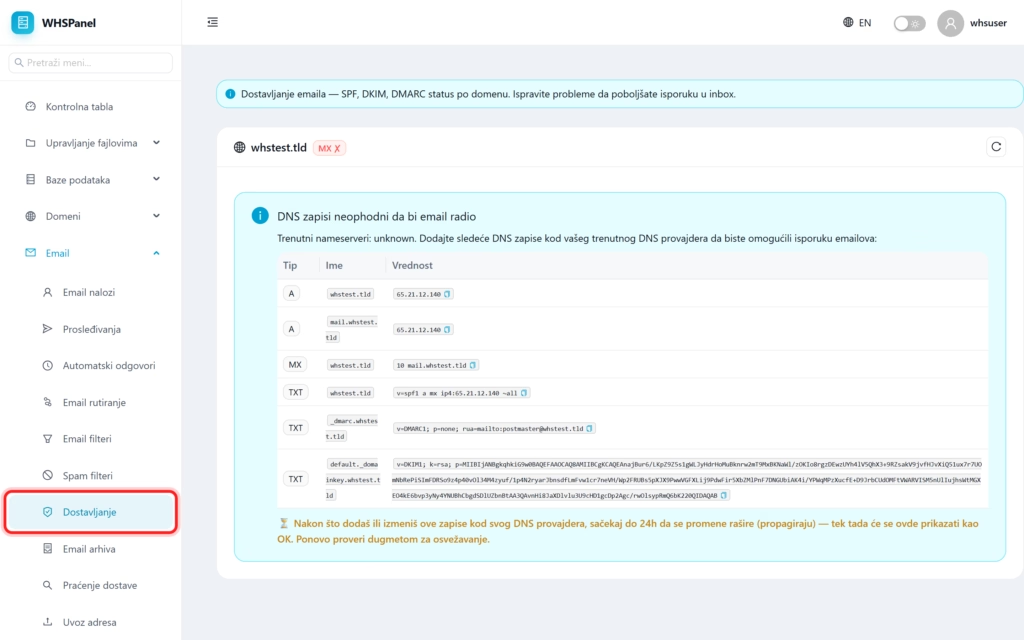
Delivery shows the status of key DNS records for email by domain (MX, SPF, DKIM, DMARC) and the exact values that need to be added to your DNS provider in order for the email to work at all and arrive in the inbox and not in spam.
1. Overview
Open in the menu Email well Delivery. For each domain, you can see whether the records are correct. If the panel shows that the MX is not pointing to the server, the mail will not arrive until you fix it.
2. What do these records mean?
| Record | What is it for? |
|---|---|
| MX | Tells the entire internet where to send mail for your domain. It must point to our server. |
| SPF | Specifies which servers are allowed to send mail on behalf of your domain. Prevents sender spoofing. |
| DKIM | It digitally signs your messages, so the recipient can check that they have not been altered in transit. |
| DMARC | A policy that tells what to do with messages that fail SPF or DKIM checks. |
3. How to correct records
- The panel displays the exact records (Type, Name, Value), each with a copy button.
- Add them with your DNS provider (or through Domains well DNS if you run DNS with us).
- Wait for the changes to propagate (propagation takes up to 24 hours).
- Click the refresh button to make the status OK.
Note: until the MX points to the server, email will not work. SPF, DKIM and DMARC are not mandatory for mail to arrive, but they significantly increase the reputation of your messages and reduce the chance of them ending up in the recipient's spam.
