
Bot Manager controls how automatic bots interact with your site. Bots are programs that visit a site: some are useful (like the Google search crawler), while others steal content, consume traffic or look for vulnerabilities. Here, for each type of bot, you choose what happens.
1. Overview
Open in the menu Security well Bot manager. The tabs show how many bot categories are allowed, blocked or challenged. Bots are grouped into categories: Search engines, SEO tools, AI crawlers and Bad bots.
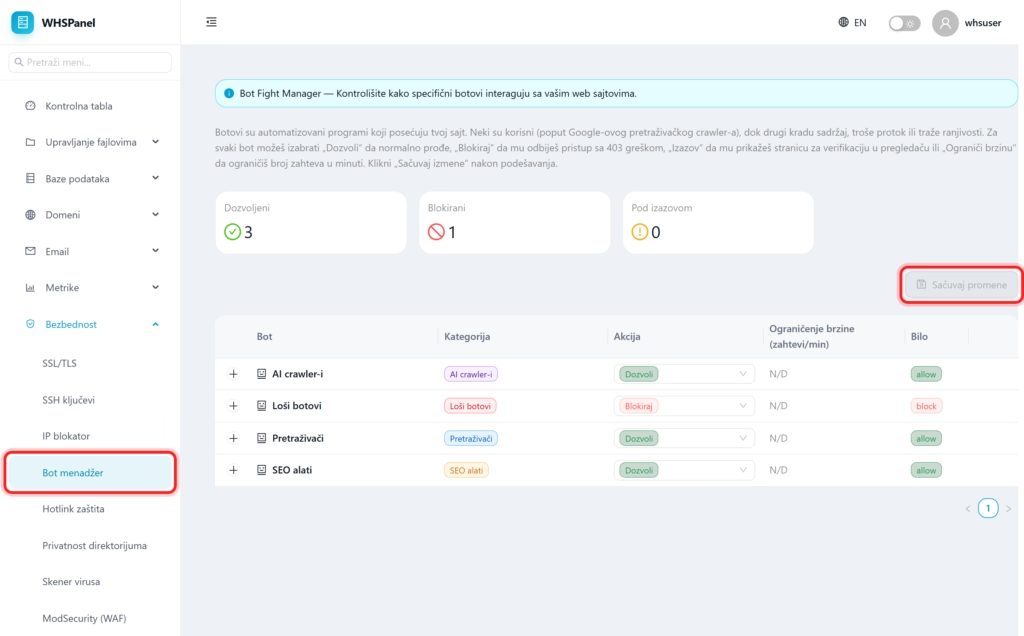
2. Actions per bot
| Action | What does it do? |
|---|---|
| Allow | The bot goes through and accesses the site normally. |
| Block | The bot is being denied access with a 403 error. |
| Challenge | The bot is shown a verification page in the browser. |
| Limit speed | Limits the number of requests per minute that the bot can make. |
For each category, choose an action, then click Save changes.
Note: leave Search engines on Allow, because Google and Bing index your site and bring visitors from search. Bad bots block. For AI crawlers decide for yourself, depending on whether you want your content to be used by artificial intelligence.
