
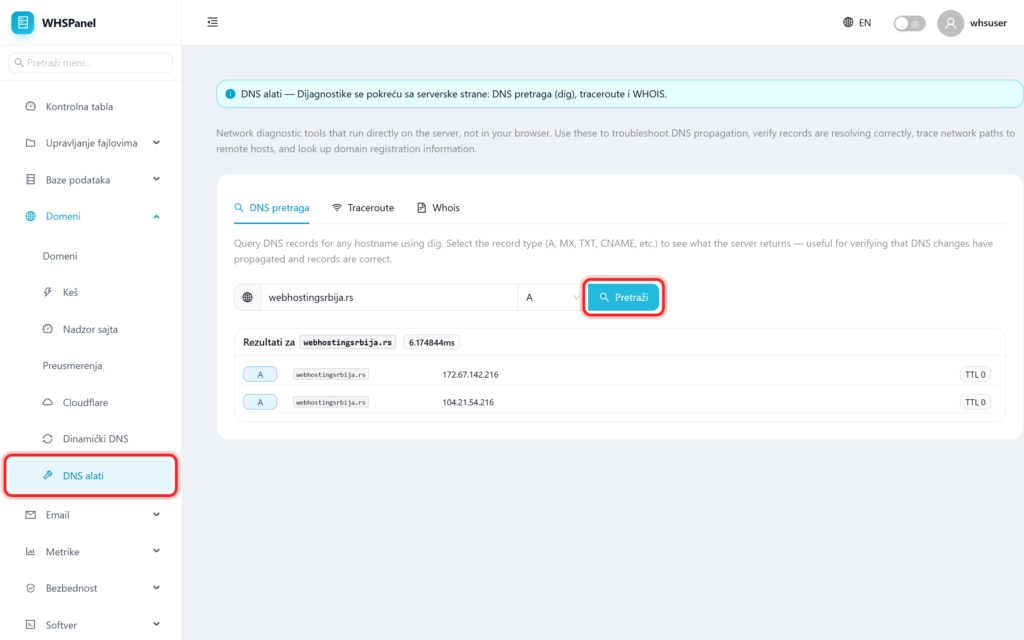
DNS tools run network diagnostics from the server side, not from your browser. You use them to check if DNS changes have propagated, if records show correctly, to trace the network path to a remote host, and to see domain registration information. There are three tabs at the top: DNS lookup, Traceroute and Whois.
1. DNS lookup (dig)
- Enter the hostname (for example
mysite.rs). - Select record type: A, MX, TXT, CNAME and the like.
- Click Search.
The result shows what the server returns: the name and time of the query, and for each record found its type, hostname, value (for example, the IP address for the A record), and TTL (how long the record is cached). This is the fastest way to confirm that the A record is pointing to the right IP, the MX to the right mail server, or that the DNS changes have been propagated.
2. Traceroute and Whois
| Card | What is it for? |
|---|---|
| Traceroute | Traces the network path to the remote host step by step. Useful for connection problems and slowness. |
| Whois | Displays domain registration information (registrar, expiration dates, name servers). |
Note: since the checks are performed from the server, the results show what the server sees, which is more reliable than checking from a local browser when testing DNS propagation. If you just changed your DNS record, wait for it to propagate (up to 24 hours) and check here.
