
Availability monitoring checks if your site is working and sends you an email as soon as it stops responding. That's how you find out about the problem before visitors tell you about it. Options appear when you select a domain.
1. How it works
The panel checks every minute whether your site is responsive. Each check is deliberately repeated multiple times within minutes, using two different paths: via DNS and directly to the IP address. The site is marked as unavailable only when all attempts have failed, thus avoiding false alarms. If at that moment our server has a problem with the network, that moment does not count for you and does not enter your percentage of availability.
2. How to turn on monitoring
- Open in the menu Domains well Site monitoring.
- In the field Choose a domain select the site you want to follow.
- Turn on the switch. Turn on monitoring.
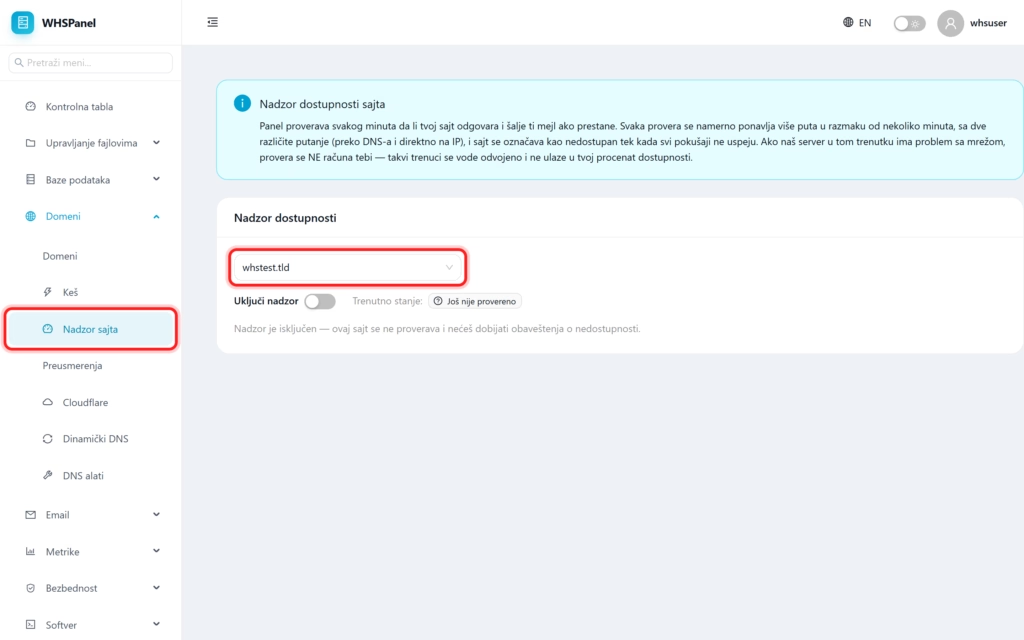
3. Current status
Next to the switch is Current status site. Until the monitoring does the first check, it says "Not yet checked", and later it shows whether the site is available or not. When monitoring is turned off, the site is not checked and you do not receive notifications.
Note: the crash notification arrives at your contact email, so check that the address is correct (it can be set in the Settings section). Monitoring is an excellent early warning of failures, but it is no substitute for backups and regular site maintenance.
