
A full page cache is a server-level speedup. It serves ready-made HTML pages directly from disk to anonymous visitors and completely skips PHP, so pages load much faster and the server can handle much more traffic. All options appear when you select a domain.
1. Choose a domain
Open in the menu Domains well Cash, and in the field Choose a domain select a site. Only then will the cache status and all options for that domain be displayed.
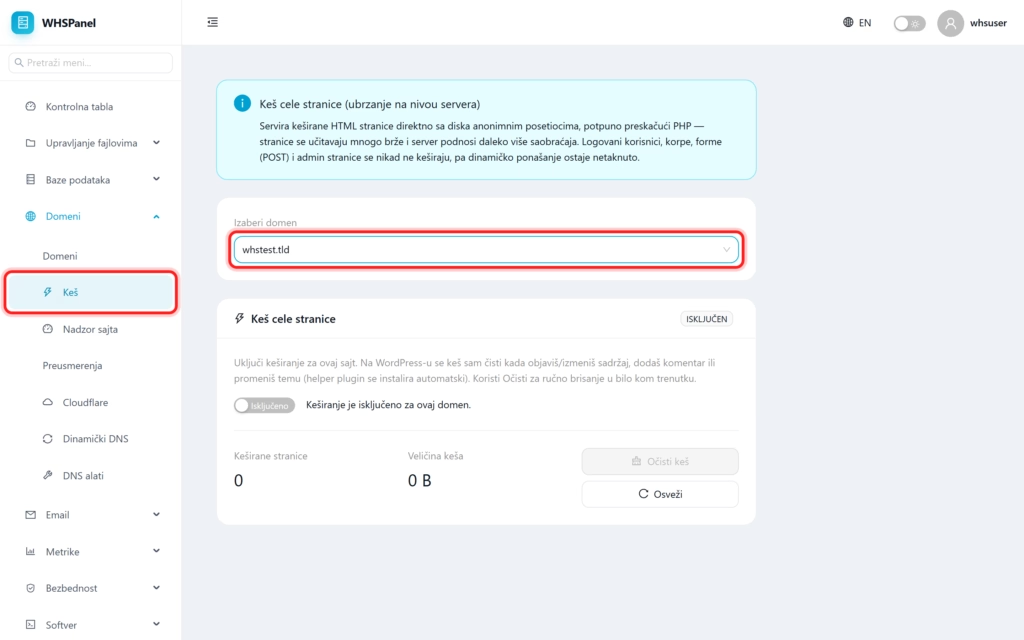
2. Activation and status
Panel Full page cache top right shows status (ON or OFF). Switch On / Off you enable or disable the cache for that domain. When it is turned off, it says that the site is not cached.
3. Statistics and cache cleaning
| Item | Meaning |
|---|---|
| Cached pages | How many pages are currently in the cache. |
| Cache size | How much space does the cache take up?. |
| Clear cache | Manually clears all cached pages immediately (for example when you want visitors to see changes immediately). |
| Refresh | Reloads cache figures. |
4. What is NOT cached
Dynamic behavior remains intact. Logged in users, shopping carts, forms and each are never cached POST request, not even the admin page.
WordPress: on a WordPress site, the cache is cleaned automatically when you publish or edit content, add a comment or change the theme (the plugin is installed automatically), so you don't have to manually clear the cache after each change.
Note: cache is most useful for sites with many anonymous visitors (blogs, presentations, news). It still speeds up stores and membership sites, because it processes all unlogged visitors by caching, while the shopping cart and account work normally.
