
Email routing determines where incoming mail is delivered for each domain, and the default address (Catch-All) determines what happens to messages sent to addresses that do not exist on your domain.
1. Mail routing
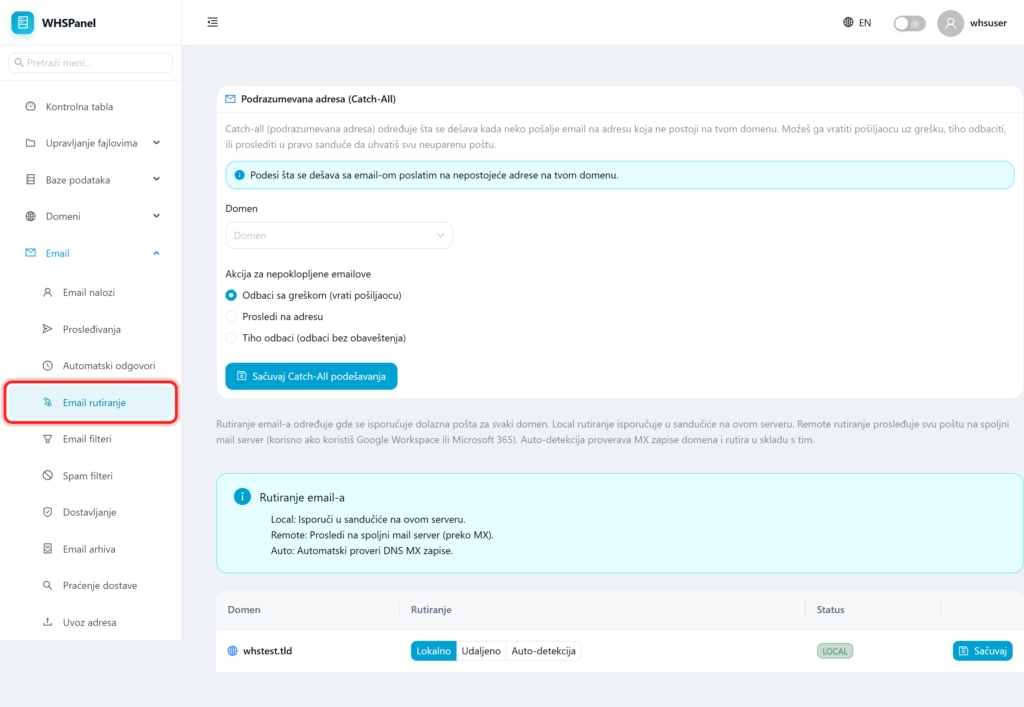
Open in the menu Email well Email routing. For each domain, you choose the delivery method:
| Mode | What does it do? |
|---|---|
| Local | Delivers mail to mailboxes on this server (you use email accounts from the panel). |
| Remote | Forwards all mail to an external mail server via MX records. Use this if you manage your email through Google Workspace or Microsoft 365. |
| Auto-detection | Automatically checks a domain's MX records and routes accordingly. |
Select the mode for the domain and click Save.
2. Default Address (Catch-All)
Catch-All determines what happens to mail sent to a non-existent address on your domain. Choose a domain, then an action:
- Reject with error: returns the message to the sender with a notification that the address does not exist.
- Forward to the address: sends all such mail to a single mailbox of your choice.
- Quietly dismiss: discards the message without notifying the sender.
Click Save Catch-All settings.
Note: if you run your email through Google or Microsoft, set the routing to Remote that the mail goes to them. Catch-All is the safest Reject with error or Quietly dismiss., because forwarding all the odd mail easily fills the inbox with spam.
