
The Resources section tracks the consumption of your hosting account: processor, memory, disk operations and processes. Limits are enforced at the kernel level, so if you exceed them, processes are automatically slowed down or terminated. Here you can see if your site hits these limits.
1. Live meters
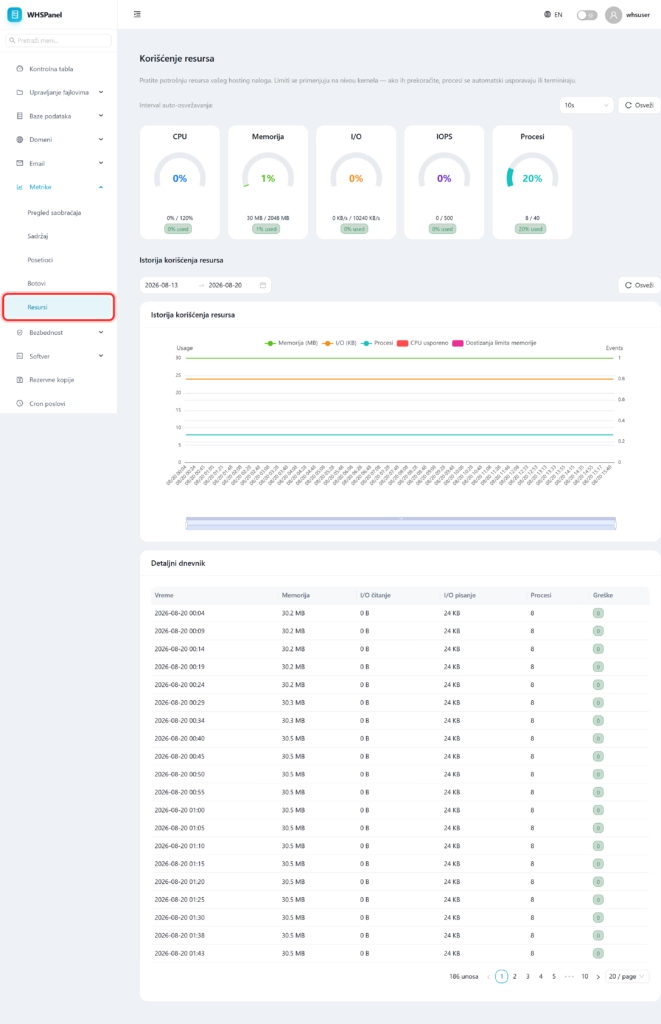
Open in the menu Metrics well Resources. At the top are the meters with the current state and limit:
| Meter | What does it show? |
|---|---|
| CPU | Account processor usage against the allowed limit. |
| Memory | Working memory busy. |
| I/O | Read and write speed per disk. |
| IOPS | Number of disk operations per second. |
| Processes | Number of concurrent account processes. |
You select the automatic refresh interval at the top right.
2. History and detailed log
Below the meter is Resource usage history (chart for the selected period) i Detailed log with exact time values: memory, I/O read and write, number of processes and errors (for example slowdown due to reaching a limit).
Note: if your site slows down at times, check here if you are hitting the CPU or memory limit at those times. Constantly high consumption means that the site needs to be optimized (cache, database, heavy plugins) or that you need a bigger package.
