
Web Application Firewall (WAF) inspects every HTTP request to your domains and blocks attacks like SQL injection, XSS (cross-site scripting), file inclusion and code execution before they reach your application. It stands between the internet and the site and automatically catches common attack patterns. Engine is OWASP Coraza.
1. Domain protection
Open in the menu Security well ModSecurity (WAF). On the card Domain protection you enable WAF per domain and choose the mode and rule level. The tab shows how many domains are protected.
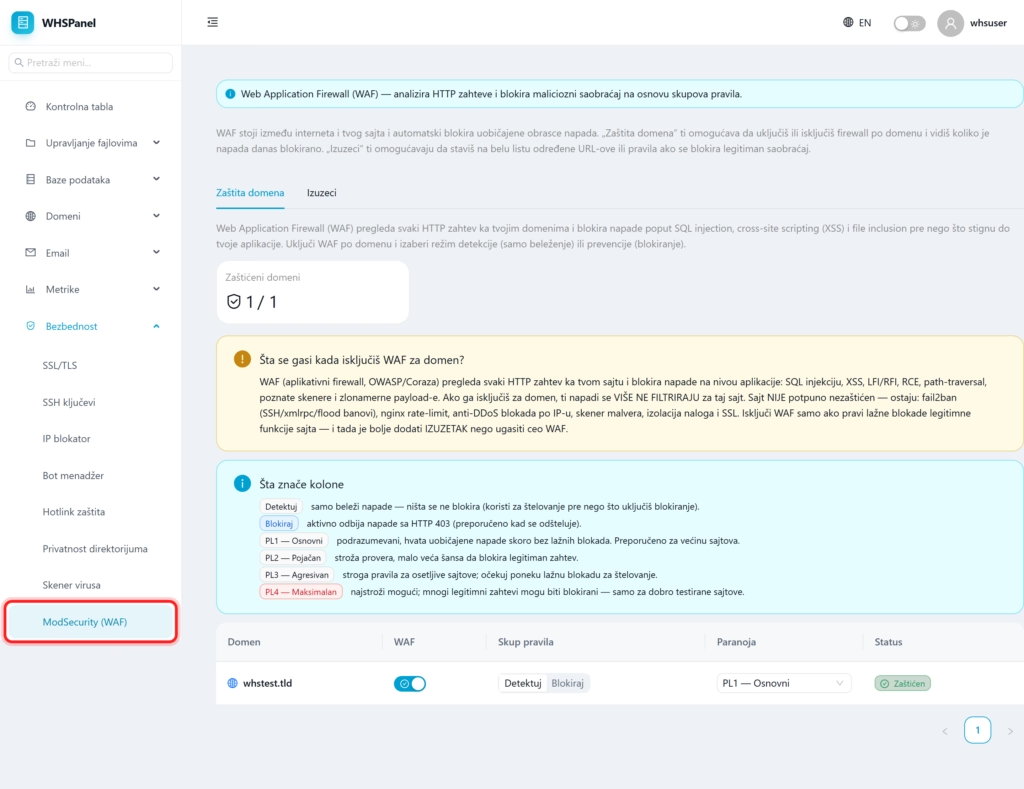
2. Operating mode
| Mode | What does it do? |
|---|---|
| Detect | It only records attacks, nothing is blocked. Use to steltel before you turn on blocking. |
| Block | Actively rejects attacks with error 403. Recommended when the rule is compensated. |
3. Level of paranoia
The level determines how strict the rules are:
- PL1 Basic: default, catches common attacks with almost no fake blocks. Recommended for most sites.
- PL2 Reinforced: stricter checking, slightly higher chance of blocking a legitimate request.
- PL3 Aggressive: strict rules for sensitive sites, with some fake blocking.
- PL4 Maximum: strictest, many legitimate requests may be blocked. Only for well-tested sites.
On the card Exceptions you can whitelist certain addresses or rules if the WAF blocks something legitimate.
Note: if the WAF makes fake blocks of legitimate site functions, it is better to add exception or lower the paranoia level than shut down the entire WAF. Even when WAF is turned off for a domain, the site is still protected by other layers (fail2ban, rate limiting, anti-DDoS protection, malware scanner, account isolation, and SSL), but application-level attacks are no longer filtered.
