
Persistent PHP workers (for example Laravel queue:work) work as a systemd service and continue to work even after logging out, closing the terminal and restarting the server, within the limits of your package. You use them for background jobs and task queues.
1. Laravel Scheduler
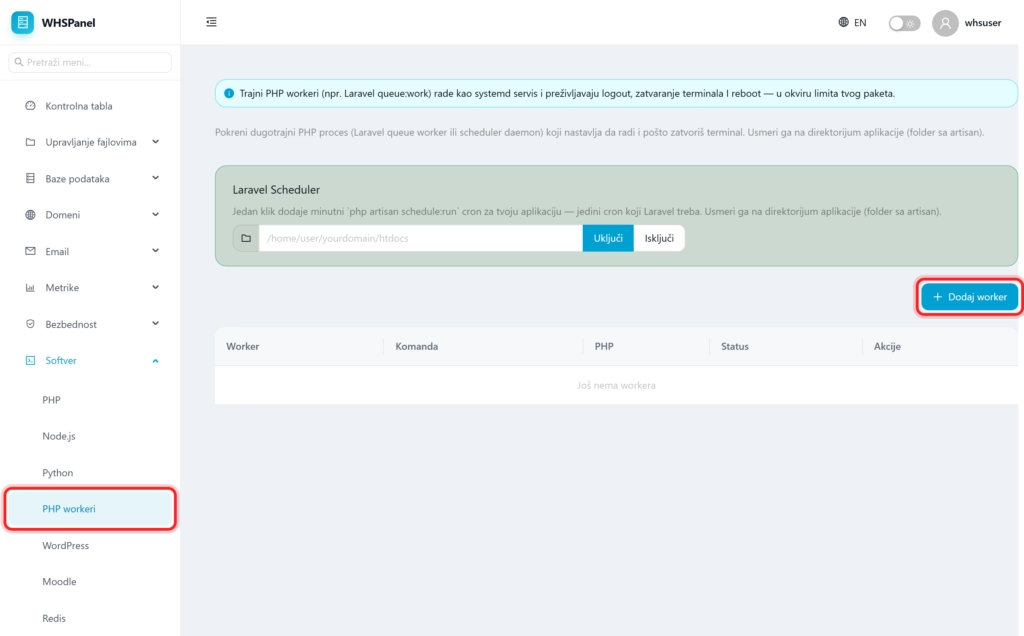
Open in the menu Software well PHP workers. Part Laravel Scheduler adds a minute with one click php artisan schedule:run cron for your application (that's the only cron Laravel needs). Enter the path to the application directory (the folder in which the artisan) and click Turn on.
2. How to add a worker
- Click Add worker.
- Enter the command (for example Laravel
queue:work) and the application directory. - A worker is started as a persistent process. In the table you can see worker, command, PHP version and status.
Note: worker keeps the process constantly active, so it is ideal for tasks that must not wait for a web request: sending emails, processing images, task queues. For ordinary scheduled Laravel tasks, the Scheduler is enough, you don't need a special worker.
