
The virus scanner checks your hosting files for viruses, malware, web shell scripts, and injected code that attackers may have uploaded. The scan engine is ImunifyAV (with ClamAV as a backup).
1. How to start the scan
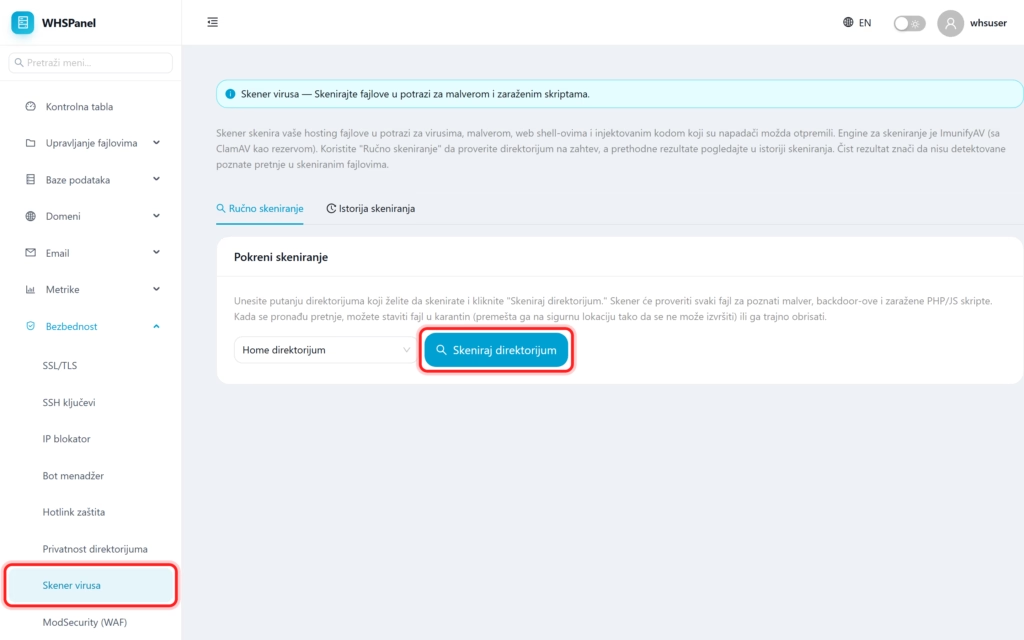
Open in the menu Security well Virus scanner. On the card Manual scanning:
- In the box, select the directory you want to check (for example Home directory).
- Click Scan directory.
The scanner checks each file for known malware, backdoors, and infected PHP and JavaScript scripts.
2. Result and quarantine
A clean result means that no known threats were found in the scanned files. If the threat is found, you can put the file in quarantine (it is moved to a safe location where it cannot be executed) or to delete it permanently. You can see the previous scans on the card Scan history.
Note: run a scan if you notice strange site behavior, unknown files or after a suspicious login. The scanner catches known threats, but is not a substitute for regularly updating CMS, themes and plugins, which are the most common entry points for attacks.
