
The PHP selector allows you to select the PHP version for each domain separately and fine-tune the PHP limits (php.ini). All options appear only when you choose a domain, because the settings are valid independently for each site on your account.
1. Choose a domain
Open in the menu Software well PHP. In the field Domain select the site you are changing PHP to. Only then will all options for that domain open: current version, version selection and php.ini settings.
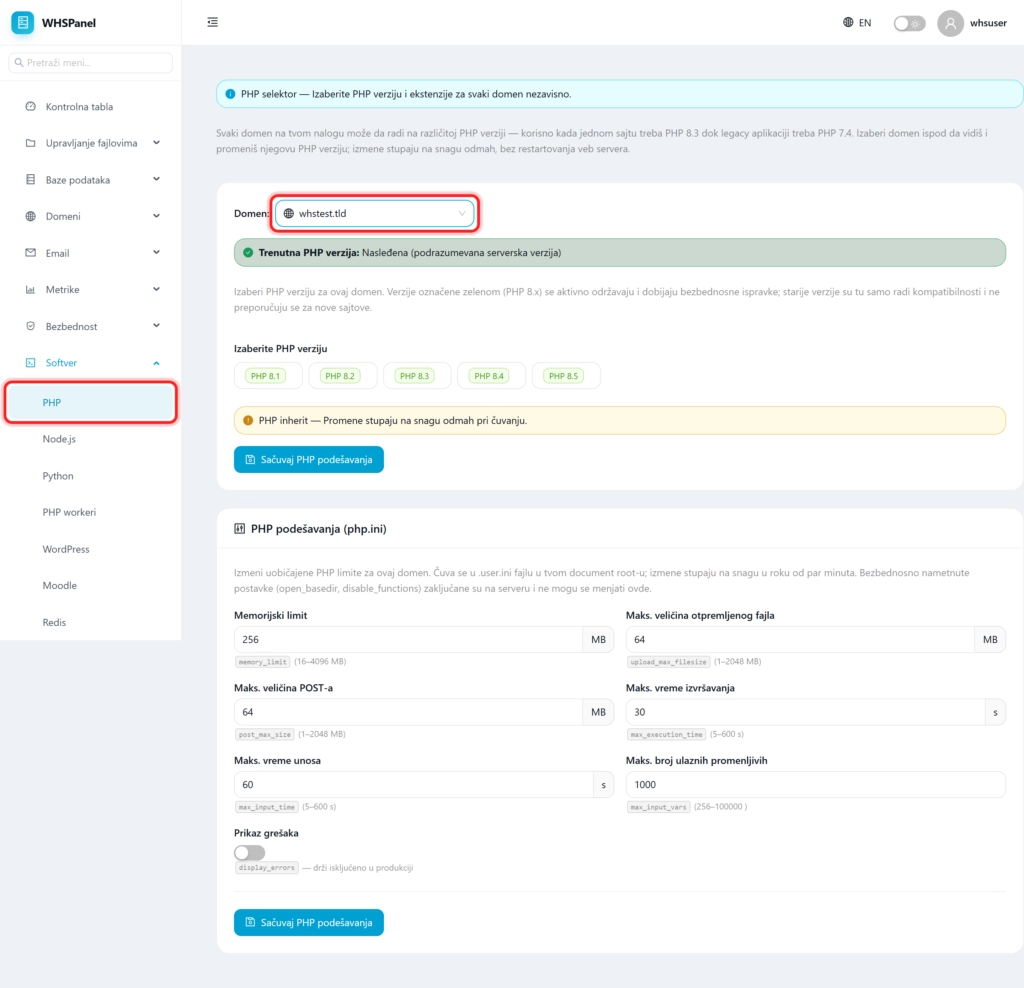
2. Choosing a PHP version
It says at the top Current PHP version. "Legacy" means that the domain uses the default server version. Below you select the version from the offer (for example PHP 8.1 to 8.5):
- Green versions (8.x) are actively maintained and receive security updates. For new sites use them.
- Older versions are only there for compatibility with legacy applications and are not recommended.
Click on the desired version and Save PHP settings. The change takes effect immediately, without restarting the web server.
3. PHP settings (php.ini)
In the work PHP settings you change the usual PHP limits for that domain. They are stored in .user.ini file in the document root and apply in a few minutes.
| Option | What does it do? |
|---|---|
Memory limit (memory_limit) | How much memory one PHP request can use (16 to 4096 MB). Heavy sites (WooCommerce, big plugins) ask for more. |
Max. the size of the uploaded file (upload_max_filesize) | The largest file that can be uploaded (1 to 2048 MB). Zoom in for large images, video or import. |
Max POST size (post_max_size) | The largest amount of data in one form submission. It should be greater than or equal to the upload size. |
Max execution time (max_execution_time) | How many seconds the script can run before terminating (5 to 600 s). |
Max input time (max_input_time) | How many seconds PHP is allowed to read input data. |
Max. number of input variables (max_input_vars) | How many fields one form can send (256 to 100000). Essential for large forms and themes. |
Error display (display_errors) | Shows PHP errors on the page. Turn it on for development only, and keep it off in production. |
When you set the values, click Save PHP settings.
Note: security-enforced settings (eg
open_basediranddisable_functions) are locked on the server and cannot be changed here. For most sites, the default values are sufficient; increase limits only when the application requires it.
