
Python App Manager runs WSGI and ASGI Python applications (Django, Flask, FastAPI, and others) through the Nginx Unit, which itself manages the processes and virtual environment. Dependencies are installed from requirements.txt, without the need for SSH access. It works on the same principle as Node.js App Manager.
1. Overview
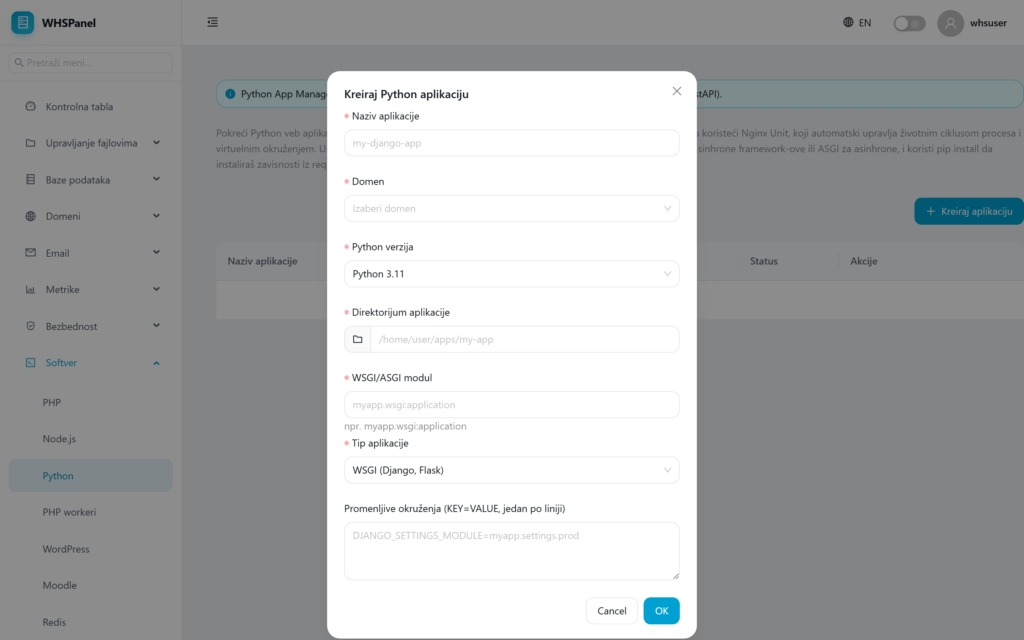
Open in the menu Software well Python. The table shows your applications with columns Application name, Python (version), Type (WSGI or ASGI), Entry module, Status and Actions.
2. How to create an application
- Click Create an application.
- Application name and Domain.
- Python version (for example 3.11).
- Application directory Where is the code?.
- WSGI/ASGI module: entry point (for example
myapp.wsgi:application). - Application type: WSGI for synchronous (Django, Flask) or ASGI for asynchronous.
- Environment variables if necessary, then click OK.
3. Application controls
When the application is built, it appears in a table with the same set of controls as Node applications:
| Control | What does it do? |
|---|---|
| Start / Stop / Restart | Starts, stops, and restarts the application. |
| pip install | Installs dependencies from requirements.txt into an isolated virtual environment. |
| Edit | Changes settings (version, module, environment variables). |
| Delete | Removes the application. |
Note: for Django a module is usually
project.wsgi:application, and in the variable environment you addDJANGO_SETTINGS_MODULE. Before starting, set the code irequirements.txtto the application directory, then run the dependency installation and start the application.
